
facetwp_builder_number_separators
Overview
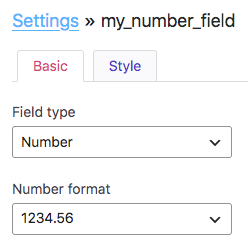
This filter, available in FacetWP v4.6+, lets you use custom decimal and thousands separators for the output of Listing Builder items with a “Field type” setting set to “Number, and a “Number format” set to anything other than “None”, as shown in the image on the right.
Without this hook, FacetWP’s main “Separators” setting is used to interpret, parse, and output the values of these kinds of Number-type builder items. This hook can be used to override the main “Separators” setting for all or specific builder items. This can be useful if your Number field values have opposite decimal/thousands separators from the main “Separators” setting, and you want to output these values in this opposite format.
Parameters
- $separators | array | An associative array of thousands and decimal separator strings
- $item | array | An associative array of builder item data:
How to use custom PHP code?
PHP code can be added to your (child) theme's functions.php file. Alternatively, you can use the Custom Hooks add-on, or a code snippets plugin. More info
$item = [ 'type' => 'item', 'source' => 'cf/my_number_field', 'settings' => [ 'field_type' => 'number', 'number_format' => 'n.nn', 'prefix' => '', 'suffix' => '', 'is_hidden' => false, 'name' => 'el-yntd3', 'css_class' => '', // other settings based on the item type ] ];
Example
The following example parses and outputs the number value(s) in a builder item with the unique name el-yntd with a comma as decimal separator and a dot as thousands separator, while the main FacetWP “Separators” setting is set to dot decimal and comma thousands.
The hook has access to the $item array, which contains the item’s source field name in $item['source'], and the item’s unique name (as set in the item’s “Unique name” setting) in $item['settings']['name']. You can use this to customize/override the separators only for specific builder items.
How to use custom PHP code?
PHP code can be added to your (child) theme's functions.php file. Alternatively, you can use the Custom Hooks add-on, or a code snippets plugin. More info
// Requires FacetWP v4.6+ add_filter( 'facetwp_builder_number_separators', function( $separators, $item) { // Optionally limit custom separators to a specific Listing Builder builder item if ( $item['settings']['name'] == 'el-yntd3' ) { // Replace 'el-yntd3' with the unique name of your Number-type builder item. $separators['thousands'] = '.'; $separators['decimal'] = ','; } return $separators; }, 10, 2 );