

- Help Center Home
- Getting started
- Introducing FacetWP
- Installation and your account
- FAQ
- How it works
- What are facets?
- Facet types
- Built-in facet types
- Checkboxes
- Dropdown
- Radio
- fSelect
- Hierarchy
- Slider
- Search
- Autocomplete
- Date Range
- Number Range
- Rating
- Proximity
- Map
- Pager + load more
- Sort
- Reset
- User Selections
- Add-on facet types
- Hierarchy Select
- Range List
- Time Since
- A-Z Listing
- Color
- Exclude
- Legacy facet types
- Proximity (legacy)
- Map (legacy add-on)
- Custom facet types
- Indexing
- Listing templates
- Extras & integrations
- Add-on features and extras
- Using FacetWP with …
- Built-in integrations
- Advanced Custom Fields
- WooCommerce
- SearchWP
- WP-CLI
- Add-on integrations
- Blocks
- Bricks
- Elementor
- Beaver Builder
- WP Recipe Maker and Tasty Recipes
- Relevanssi
- WPML and Polylang
- Meta Box
- Flatsome (theme)
- External integrations
- Breakdance
- Document Library Pro
- Listify (theme)
- Listable (theme)
- WPGraphQL
- Tips, tricks and known issues
- WordPress multi-site
- WP All Import
- WebToffee Import Export
- Intuitive Custom Post Order
- Custom Taxonomy Order
- Category Order and Taxonomy Terms Order
- Advanced Taxonomy Terms Order
- Post Types Order
- Easy Digital Downloads
- EDD Reviews
- WP Job Manager
- Genesis framework
- WP External Links
- ElasticPress
- Yoast SEO
- All in One SEO (Pro)
- The Events Calendar (Pro)
- Google Analytics 4
- Image Optimization by Optimole
- Meow Lightbox
- Cookiebot
- Members
- MemberPress
- Co-Authors Plus
- Weglot
- Caching, hosting & security
- Object caching
- WP Rocket
- Cloudflare
- WP Engine
- Pressable
- New Relic
- WordPress REST API Authentication
- All-In-One Security (AIOS)
- Fast Velocity Minify
- Incompatibilities
- Incompatible plugins and themes
- Troubleshooting
- Troubleshooting guide
- Using the right query
- Common issues
- Common indexing issues
- Get support
- Developers
- Hooks reference
- Indexing hooks
- Querying hooks
- Output hooks
- facetwp_facet_display_value
- facetwp_facet_html
- facetwp_facet_render_args
- facetwp_facet_pager_link
- facetwp_facet_sort_options
- facetwp_template_html
- facetwp_shortcode_html
- facetwp_render_params
- facetwp_render_output
- facetwp_builder_item_value
- facetwp_builder_dynamic_tags
- facetwp_builder_dynamic_tag_value
- Advanced hooks
- facetwp_i18n
- facetwp_scripts
- facetwp_assets
- facetwp_asset_html
- facetwp_facet_types
- facetwp_facets
- facetwp_templates
- facetwp_facet_sources
- facetwp_excluded_custom_fields
- facetwp_excluded_custom
_fields_like - facetwp_use_preloader
- facetwp_debug_hooks
- facetwp_admin_settings_capability
- upt_admin_settings_capability
- Deprecated hooks
- JavaScript reference
- Shortcodes reference
- How FacetWP works
- The FacetWP URL
- FacetWP speed and limits
- FacetWP and taxonomies
- FacetWP REST API
- Tutorials
- Code snippets library
- Feedback
- What’s new
- News and announcements
- Changelog
Yoast SEO

If your listing is not working when Yoast SEO is active, make sure to enable “Advanced query detection” in FacetWP’s settings. (This setting was called “Strict query detection” in FacetWP versions older than v4.5).
Another thing to look out for when using Yoast SEO is to not enable the “Remove unregistered URL parameters” setting:
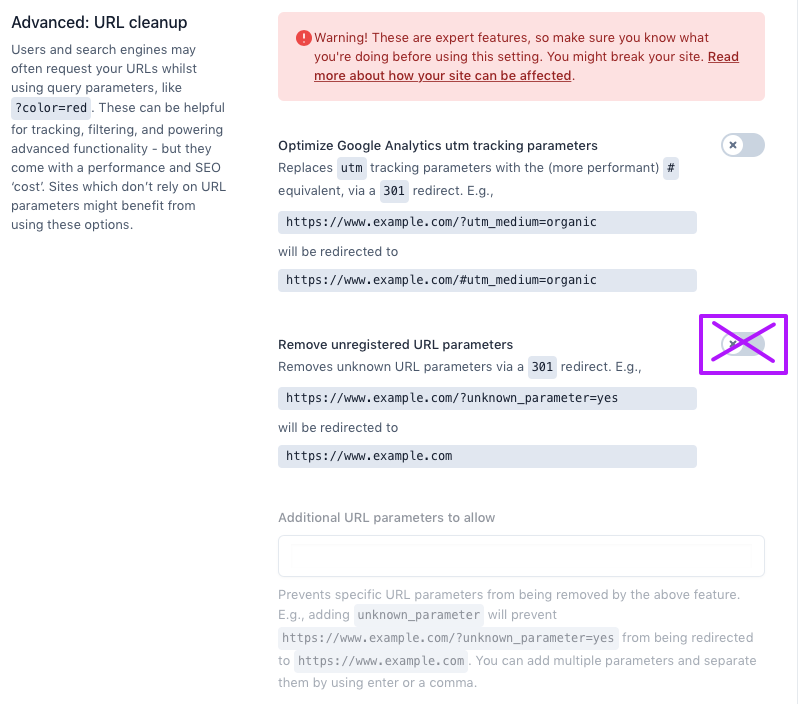
This setting is located under:
Yoast SEO > Settings > Advanced > Crawl optimization > Advanced: URL cleanup > Remove unregistered URL parameters
If you enable this setting, Yoast SEO will strip FacetWP’s URL parameters and create 301 redirects, both when the page is loaded with facet selections, or with AJAX when filtering. This redirect prevents facets from working.
Warning:Keep in mind that with the “Remove unregistered URL parameters” setting enabled, Yoast will only remove the URL parameters when not logged in . This can be confusing if you don’t see issues when developing, and facets malfunction when testing in another browser (logged out), or on mobile.
See also
Last updated: May 14, 2026