
Co-Authors Plus
If you’re using the Co-Authors Plus plugin by Automattic to create multiple authors per post, you’ll notice that using these authors in facets, to filter by author, or retrieving authors in a listing template, will not work as expected.
This happens because this plugin stores the authors in a custom taxonomy author, where each author is a term. The term name is the author’s username. And the term slug is the author’s username but prefixed with cap-.
Indexing and displaying (co-)authors in a facet
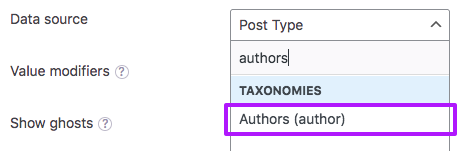
To use the author taxonomy in a facet, instead of “Post Author”, you need to select “Authors (author)” under the “Taxonomies” heading in the facet’s data source dropdown.
This will work to index all types of authors: regular authors (users), co-authors, and guest authors.
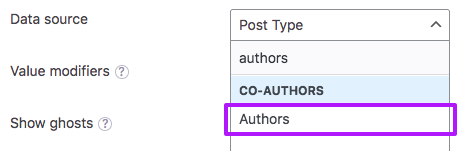
Optionally, you could add the following snippet to your (child) theme’s functions.php. It will replace the author taxonomy in the facet’s data source dropdown with a new “Co-authors” heading, with one option “Authors”. Choosing this source will do the same as choosing the author taxonomy without this snippet.
How to use custom PHP code?
PHP code can be added to your (child) theme's functions.php file. Alternatively, you can use the Custom Hooks add-on, or a code snippets plugin. More info
add_filter( 'facetwp_facet_sources', function( $sources ) { if ( class_exists( 'coauthors_plus') && isset( $sources['taxonomies']['choices']['tax/author'] ) ) { $sources['co_authors'] = array( 'label' => __( 'Co-Authors', 'fwp' ), 'choices' => array( 'tax/author' => __( 'Authors', 'fwp' ), ) ); unset( $sources['taxonomies']['choices']['tax/author'] ); // Remove the taxonomy duplicate } return $sources; }, 10 );
Note that this snippet will also replace “Authors (author)” with “Authors” in Listing Builder listing items’ data source dropdowns.
Show the (co-)authors’ display names in the facet
By default, a facet that has the author taxonomy set as data source will show the authors’ usernames as choices. To show the authors’ display names instead, you can use the facetwp_index_row hook as follows.
The snippet replaces the usernames with the display names in the facet, both for authors that are WP users and for guest authors that are not WP users. Add the snippet to your (child) theme’s functions.php, and make sure to re-index.
How to use custom PHP code?
PHP code can be added to your (child) theme's functions.php file. Alternatively, you can use the Custom Hooks add-on, or a code snippets plugin. More info
add_filter( 'facetwp_index_row', function( $params, $class ) { if ( 'tax/author' !== $params['facet_source'] ) { return $params; } $value = (string) $params['facet_value']; $nicename = substr( $value, 4 ); // Remove "cap-" to get the username $display_name = ''; // If author is a WP user, get the display name $user = get_user_by( 'slug', $nicename ); if ( $user ) { $display_name = $user->display_name; } // Guest authors are not WP users, find their display name if ( empty( $display_name ) ) { global $coauthors_plus; if ( isset( $coauthors_plus ) && is_object( $coauthors_plus ) && method_exists( $coauthors_plus, 'get_coauthor_by' ) ) { $cap_author = $coauthors_plus->get_coauthor_by( 'user_login', $nicename ); if ( $cap_author && ! empty( $cap_author->display_name ) ) { $display_name = $cap_author->display_name; } } } $params['facet_display_value'] = $display_name; return $params; }, 10, 2 );
Display (co-)authors in listing items
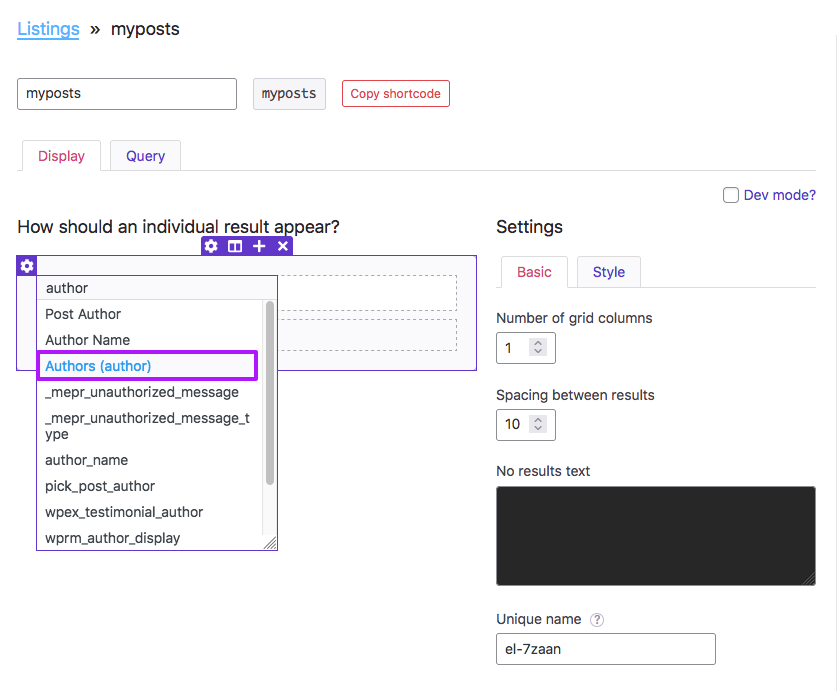
In a Listing Builder listing, you can display a comma-separated list of authors in each post item by creating a new builder item with source set to the author taxonomy “Authors (author)”, as shown in the image on the right. Note that if you are using the above facetwp_facet_sources snippet, it will show up as only “Authors” instead.
The post items will then display the author usernames in a comma-separated string. For which you can adapt the separators with the “Separator” item setting.
To customize this authors output, you can use the facetwp_builder_item_value hook.
The following code example will make the item’s output show the authors’ display names instead of their usernames, and will add a link for each author name to its author archive page. The code uses whatever separator you set in the builder item’s “Separator” item setting.
How to use custom PHP code?
PHP code can be added to your (child) theme's functions.php file. Alternatively, you can use the Custom Hooks add-on, or a code snippets plugin. More info
add_filter( 'facetwp_builder_item_value', function( $value, $item ) { if ( $item['source'] == 'tax/author' ) { global $post; $taxonomy = substr( $item['source'], 4 ); $coauthors = []; $terms = get_the_terms( $post->ID, $taxonomy ); if ( is_array( $terms ) ) { foreach ( $terms as $term ) { $coauthor = get_user_by('slug', $term->name ); $coauthor_id = $coauthor->ID; $coauthor_link = get_author_posts_url( $coauthor_id ); $coauthor_display_name = get_the_author_meta( 'display_name', $coauthor_id ); $coauthor_output = '<a href="' . $coauthor_link . '">'. $coauthor_display_name . '</a>'; $coauthors[] = $coauthor_output; } } $value = implode( $item['settings']['separator'], $coauthors ); } return $value; }, 10, 2 );
Using a custom dynamic tag to display (co-)authors
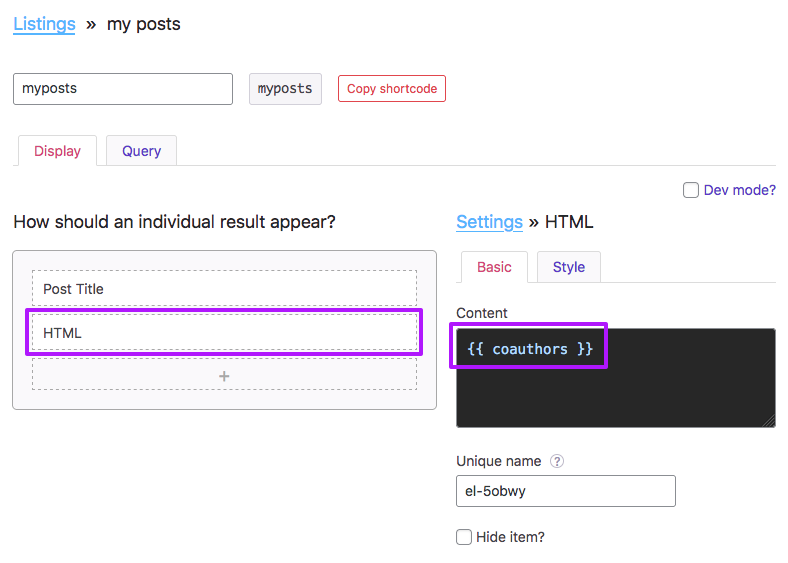
To dispay a list of authors in a post item, you can also create a custom dynamic tag, using the facetwp_builder_dynamic_tag_value hook.
Add the following snippet to your (child) theme’s functions.php to create a custom dynamic tag {{ coauthors }} that uses the Co-Authors Plus plugin’s own coauthors_posts_links() template tag to output a comma-separated list of authors, with a link to their author page. The last item is preceded by and instead of a comma.
After adding the snippet, you can use the {{ coauthors }} tag in any Listing Builder item, for example in the “Content” field of an HTML item, as shown in the image on the right.
How to use custom PHP code?
PHP code can be added to your (child) theme's functions.php file. Alternatively, you can use the Custom Hooks add-on, or a code snippets plugin. More info
// Creates a custom dynamic tag {{ coauthors }} that can be used in Listing Builder items // to output comma-separated list of authors, linked to their author pages. add_filter( 'facetwp_builder_dynamic_tag_value', function( $tag_value, $tag_name, $params ) { if ( class_exists( 'coauthors_plus') ) { if ( 'coauthors' == $tag_name ) { // Authors are comma-separated, with the last item preceded by ' and' instead of a comma. // See: https://github.com/Automattic/Co-Authors-Plus/wiki/Template-tags $tag_value = coauthors_posts_links( ',', ' and ', null, null, false ); } } return $tag_value; }, 10, 3 );
Query (co-)authors in a listing template
There are multiple ways to get all posts by one or more (co-)author(s) in a listing template query. However, only these two methods will work for all types of authors (normal authors (users), co-authors, and guest authors):
- Using a tax_query query argument, to filter the query by the
authortaxonomy. - Using an author_name query argument, to filter the query by author name.
In theory, you could also use an author query argument (that needs the author ID as value). However, this does not work with guest authors, because they do not have an author ID.
And you may try to use an author__in query argument to pass in an array of author IDs. This does also not work with co-authors or guest authors.
Using a tax_query query argument
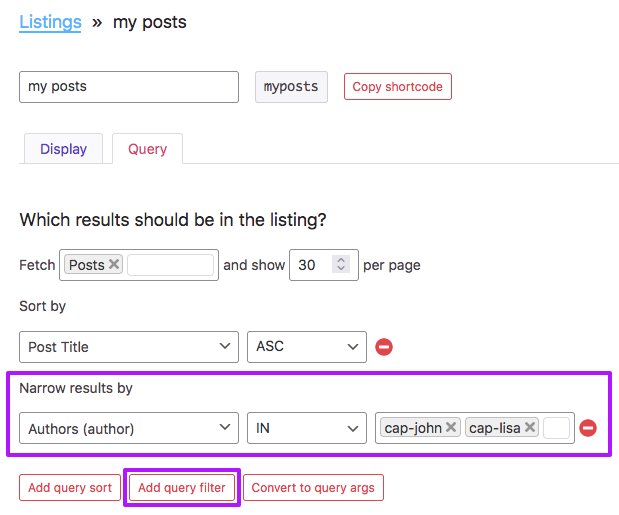
To display posts of one or more (co-)authors and/or guest authors in a listing template, you can add a tax_query query argument that filters posts by the author taxonomy.
In a Listing Builder listing, you can easily add a query filter to narrow results by “Authors (author)” IN and then list your author slugs, which need to be prefixed with cap-, as shown in the image on the right.
When using a Listing Builder listing in Dev mode, or when using another listing template type like a custom WP_Query, or using a pre_get_posts hook, you can add a tax_query argument as follows (lines 8-18).
Note that in line 11, we use the term slug to filter the query. Author term slugs are the author’s username prefixed with cap-, which means that the author name terms in the filter need to be prefixed with cap- too.
How to use custom PHP code?
PHP code can be added to your (child) theme's functions.php file. Alternatively, you can use the Custom Hooks add-on, or a code snippets plugin. More info
<?php return [ "post_type" => [ "post" ], "post_status" => [ "publish" ], "tax_query" => [ [ "taxonomy" => "author", "field" => "slug", "operator" => "IN", "terms" => [ "cap-john", "cap-lisa" ] ] ], "orderby" => [ "title" => "ASC" ], "posts_per_page" => 30 ];
You could also filter by term name, which is the author’s username, without a prefix.
Note that guest authors don’t have a visible username in the interface. You’ll have to deduce it by taking the display name, making it all lowercase, and replacing all spaces with - dashes.
How to use custom PHP code?
PHP code can be added to your (child) theme's functions.php file. Alternatively, you can use the Custom Hooks add-on, or a code snippets plugin. More info
return [ "post_type" => [ "post" ], "post_status" => [ "publish" ], "tax_query" => [ [ "taxonomy" => "author", "field" => "name", "operator" => "IN", "terms" => [ "john", "lisa" ] ] ], "orderby" => [ "title" => "ASC" ], "posts_per_page" => 30 ];
Using an author_name query argument
Instead of using a tax_query query argument, you can also filter the query by author_name, as shown in the snippet below.
The value needs to be one author’s username. It needs to be a string, so you cannot use an array. If you want to retrieve multiple authors, use a tax_query query argument instead.
Note that guest authors don’t have a visible username in the interface. You’ll have to deduce it by taking the display name, making it all lowercase, and replacing all spaces with - dashes.
How to use custom PHP code?
PHP code can be added to your (child) theme's functions.php file. Alternatively, you can use the Custom Hooks add-on, or a code snippets plugin. More info
return [ "post_type" => [ "post" ], "post_status" => [ "publish" ], "author_name" => "john", "orderby" => [ "title" => "ASC" ], "posts_per_page" => 30 ];
Using a Listing Builder listing in an author archive
If you want to use a Listing Builder listing in an author archive template, and you want this setup to work with co-authors and guest authors, the following things are important.
First of all, by default, FacetWP will use the native author archive’s query. To let FacetWP use the Listing builder listing query instead, you need to tell FacetWP to ignore the archive query, with the facetwp_is_main_query hook. To do this, add the following code to your (child) theme’s functions.php:
How to use custom PHP code?
PHP code can be added to your (child) theme's functions.php file. Alternatively, you can use the Custom Hooks add-on, or a code snippets plugin. More info
add_filter( 'facetwp_is_main_query', function( $is_main_query, $query ) { if ( $query->is_author() && $query->is_main_query() ) { $is_main_query = false; } return $is_main_query; }, 10, 2 );
Next, the listing’s query needs to get the author name from somewhere. The following two examples, which can be used in Dev mode, show how to get it from the native author archive query, with: get_query_var( 'author_name' ).
However, this query context is not available in AJAX requests, which FacetWP uses when filtering. So when using AJAX, the two snippets below need get the author name from the page URI (the part of the URL after the domain name, without beginning and ending slashes), which would look like: author/john. In line 8 we get the last segment from the URI: john, which is the author name.
This example uses a tax_query query argument. Which would also work to retrieve multiple authors in the array on line 24 if you’d need that.
How to use custom PHP code?
PHP code can be added to your (child) theme's functions.php file. Alternatively, you can use the Custom Hooks add-on, or a code snippets plugin. More info
// On first page load, get the author_name from the query var of the author archive itself. $author_name = get_query_var( 'author_name' ); // On AJAX refresh, get the author_name from the last part of FWP uri. if ( empty( $author_name ) ) { $uri = FWP()->facet->ajax_params['http_params']['uri'] ?? ''; if ( ! empty( $uri ) ) { $author_name = basename( untrailingslashit( $uri ) ); // Get author from last segment in URI } } return [ "post_type" => [ "post" ], "post_status" => [ "publish" ], "tax_query" => [ [ "taxonomy" => "author", "field" => "name", "operator" => "IN", "terms" => [ $author_name ] ] ], "posts_per_page" => 12 ];
Alternatively, you could use an author_name query argument:
How to use custom PHP code?
PHP code can be added to your (child) theme's functions.php file. Alternatively, you can use the Custom Hooks add-on, or a code snippets plugin. More info
// On first page load, get the author_name from the query var of the author archive itself. $author_name = get_query_var( 'author_name' ); // On AJAX refresh, get the author_name from the last part of FWP uri. if ( empty( $author_name ) ) { $uri = FWP()->facet->ajax_params['http_params']['uri'] ?? ''; if ( ! empty( $uri ) ) { $author_name = basename( untrailingslashit( $uri ) ); // Get author from last segment in URI } } return [ "post_type" => [ "post" ], "post_status" => [ "publish" ], "author_name" => $author_name, "posts_per_page" => 12 ];
Note that using an author, or author__in query argument will not work with co-authors and guest authors, as explained above.