
What’s new in Elementor 1.9.4
Version 1.9.4 of the Elementor add-on was released on March23, 2026.
Improvements to prevent issues with Elementor’s Element Cache
Elementor’s Element Caching feature is incompatible with FacetWP. Our Elementor add-on page has a prominent warning to look out for this, and a section describing the issues, but we still see the issues come by often in support tickets.
To prevent these issues in FacetWP’s own Elementor widgets, we have now marked the Facet and Listing widgets as “dynamic content”. This sets these widgets’ “Cache Settings” setting (in Advanced > Layout) to “Inactive” by default.
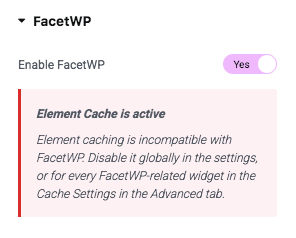
We also added a red “Element Cache is active” warning in the “FacetWP” section of supported Elementor widgets.
The warning appears if the Element Cache is globally enabled (in Elementor > Settings > Performance > Element Cache) and the current widget’s “Cache Settings” setting is explicitly set to “Active” (in Advanced > Layout).
If you see this warning, disable Element Cache globally in the settings, or for the widget itself by setting it to “Inactive” in the “Cache Settings” setting.
Note that there are some scenarios and widgets for which the warning does not appear, because we do not have access to them, like Shortcode, HTML, and Text Editor widgets (which can contain FacetWP shortcodes), and supported Anywhere Elementor Pro widgets. Keep an eye out for them, as these widgets still need their “Cache Settings” setting set to “Inactive” (or disable Element Cache globally in the settings).
Use FacetWP with a strict Content Security Policy (CSP)
In this version of the add-on, FacetWP’s inline scripts are now added with WP’s wp_print_inline_script_tag() function. Together with similar changes in version 4.5 of FacetWP itself, this makes it possible to use FacetWP on sites that use a “nonce-based” Strict Content Security Policy (CSP) to mitigate cross-site scripting (XSS).
Using the wp_print_inline_script_tag() function makes it possible to add a nonce attribute to the inline <script> tag that it prints to the page, which is needed to make nonce-based Strict CSP work. The function provides two filter hooks that can be used for this: wp_script_attributes and wp_inline_script_attributes.
The easiest way to implement a nonce-based Strict Content Security Policy (CSP) on the frontend and login screen of your site is to use a plugin like Strict CSP, or this mu-plugin. For more info on how this works, see our tutorial.
Other fixes and improvements
- We fixed a compatibility issue with the Hello Plus plugin, that caused Elementor templates not to be applied to singular posts when FacetWP is active, resulting in a white screen.
- The add-on now also uses the post types blacklist helper function introduced in FacetWP 4.5.
-
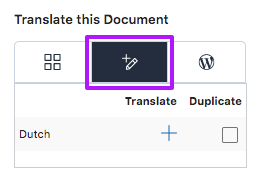
The WPML Translation Editor page setting. We added the possibility to translate Facet widget headings, Button widget labels, and the Submit Button widget’s page URL setting with the WPML Advanced Translation Editor. This also works when using facets in Elementor templates, as long as the “My Templates” post type is set to be “Translatable” in WPML. Note that the Multilingual add-on must also be installed for this.
- We added a text domain and
.potfile, so that all widget settings can now be properly translated.