
What’s new in Beaver Builder 1.5
Version 1.5 of the Beaver Builder add-on was released on March 23, 2026. This update contains the following improvements and fixes.
New, updated and deprecated FacetWP modules
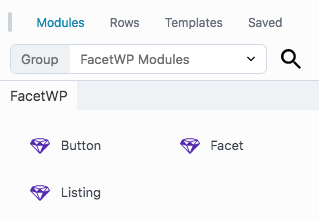
With v1.5+ of the Beaver Builder add-on installed, you’ll now find three FacetWP modules in the module selector, in the “FacetWP Modules” Group dropdown:
- Facet module – adds a facet.
- Listing module – adds a Listing Builder listing.
- Button module – adds an Apply button, a Flyout button or a Submit button.
The Facet module already existed, but was updated with a better Heading and Heading tag setting. You can now also add User Selections facets with it.
The previous Template module was renamed to Listing module. It can now also be used to add static listings. A “static” listing is a listing that does not react to facets.
The Button module is a new module that can be used to add an Apply button, a Flyout button, or a Submit button.
Deprecated FacetWP modules
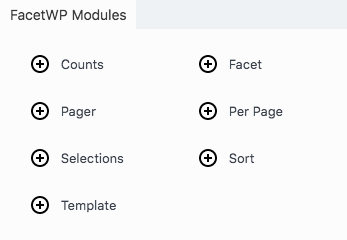
In versions older than v1.5 of the add-on, there were 5 other FacetWP modules: Pager, Per Page, Counts, Selections, and Sort. These modules are now deprecated and will be non-functional after updating. We recommend migrating them to the updated Facet module that replaces them all.
If you want to keep using these old modules, it is also possible to (temporarily) re-enable them with a hook.
Deprecated listings in module content source
We deprecated selecting FacetWP Listing Builder listing templates in supported modules, other than the Listing module. If you need to display a listing template, use a Listing module.
You will now only see FacetWP listing templates in a module’s Source dropdown if one was already selected before updating to v1.5+, or if you re-enable this feature.
Support for the new Loop module
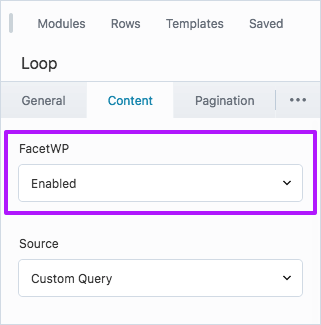
Version 1.5 of the add-on adds support for Beaver Builder’s new Loop module that comes with the Beaver Themer plugin. The integration requires Beaver Builder v2.10.1.2+ and Beaver Themer v1.5.2.3+.
The Loop module is an alternative for using the existing Posts module, but is capable of creating more complex layouts, e.g. with the Box module.
To use the Loop module, just enable its FacetWP setting and create a Custom Query in its settings (or use Main Query in archive template).
UABB Advanced Posts module
The following fixes and new features are now available for Ultimate Addons for Beaver Builder’s Advanced Posts module:
- We fixed an issue with the module repeating the post container when using a Load more Pager facet.
- We fixed the isotope feature in Grid layout.
- We added support for Masonry and Carousel layouts (set under General > Post Appearance).
- We added support for using the Equal Height Boxes or Masonry Equal Height setting (set under the Style tab), when used in Grid, Masonry, or Carousel layouts.
UABB Woo Products module
We added support for Carousel layouts (set under General > Layout) in Ultimate Addons for Beaver Builder’s Woo Products module.
Use FacetWP with a strict Content Security Policy (CSP)
In this version of the add-on, FacetWP’s inline scripts are now added with WP’s wp_print_inline_script_tag() function. Together with similar changes in version 4.5 of FacetWP itself, this makes it possible to use FacetWP on sites that use a “nonce-based” Strict Content Security Policy (CSP) to mitigate cross-site scripting (XSS).
Using the wp_print_inline_script_tag() function makes it possible to add a nonce attribute to the inline <script> tag that it prints to the page, which is needed to make nonce-based Strict CSP work. The function provides two filter hooks that can be used for this: wp_script_attributes and wp_inline_script_attributes.
The easiest way to implement a nonce-based Strict Content Security Policy (CSP) on the frontend and login screen of your site is to use a plugin like Strict CSP, or this mu-plugin. For more info on how this works, see our tutorial.
Other fixes and improvements
- We improved the rendering of facets and listings in the Beaver Builder editor. At the time of writing, not all facet types will render, which we will continue to improve. Note that facets will display but not actually function in the editor. Check your front-end page to see if your facets are functioning correctly.
- Before saving settings, and for non-rendering facets, an improved placeholder is displayed in the editor.
- Facet and Listing modules now show their labels in the sidebar Outline. Button modules will show the button type.
- Facets added with a Facet module, including their heading, can now more easily be hidden when they are empty (with no choices left after filtering), using this code snippet.
- We fixed an issue with the Beaver Builder pagination not working correctly in a FacetWP-enabled Posts module if there are also one or more other (non-FacetWP-enabled) Post modules present on the page.
- We fixed an issue with the Posts module repeating the post container when using a Load more Pager facet.
- We fixed an issue with the WooCommerce module not correctly repeating products when using a Load more Pager facet.
- We fixed an issue with the WooCommerce module causing FacetWP to not detect the correct query after using facets or pagination, resulting in an “FacetWP was unable to auto-detect the post listing” error.
- We fixed an issue with the PowerPack Content Grid module pagination.
- The language
.potfile was updated to account for all new settings and changes. -
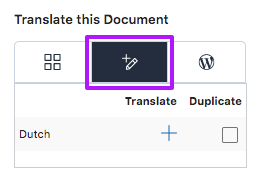
The WPML Translation Editor page setting. We added the possibility to translate Facet module headings, Button module labels, and the Submit Button module’s page URL setting with the WPML Advanced Translation Editor in WPML. This also requires the Multilingual add-on to be installed.
- We fixed an issue with malfunctioning Pager facets and module pagination, which happened when there were one or more other loop-type modules on the page, besides the FacetWP-enabled module.
- We fixed an issue with the query detection of the WooCommerce module, and subsequent malfunctioning facets, which happened when there are other loop-type modules on the page, after the FacetWP-enabled WooCommerce module.