
New facet type: Exclude

We’re excited to introduce a new, often-requested facet type: the Exclude facet.
With an Exclude facet, a user can exclude posts with the selected facet choice(s) from the listing. An example would be a listing with recipes, with a facet to exclude recipes with certain ingredients, like gluten, salt, or sugar.
The Exclude facet has four UI types to choose from: Checkboxes, Radio, Dropdown, and fSelect. It supports hierarchical taxonomies, ghosts, parent terms, value modifiers, etc.
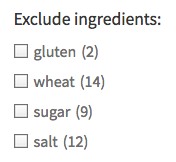
A nifty feature is that it can be used in two “states”:
- Positive: the facet displays default “positive” choices and counts, e.g. “gluten (2)”, representing 2 recipes with gluten in the listing. In this state, the facet would need an explanatory facet heading, e.g. “Exclude these ingredients:”. In the positive state, the “Reverse counts” setting needs to be disabled.
-
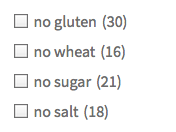
A “negative” Exclude facet with Checkboxes UI type, with a “no ” prefix and reverse counts. Negative: the facet displays “negative” choices and counts, e.g. “no gluten (30)”, or “
gluten-free (30) “, representing 30 recipes without gluten in the listing. In this state, the choices are self-explanatory and the facet would not require an explanatory heading. In the negative state, the “Reverse counts” setting needs to be enabled, and a prefix (likeno) or suffix (like-free) is needed to reverse the meaning of the choice labels.
To create an Exclude facet, first install the new add-on, which you can download in your account dashboard.
This is the first version of this add-on. Please open a support ticket if you encounter any issues.